
Australian SMEs are digital, but not always connected
Australian businesses have spent years adding websites, accounting platforms, CRM tools, cloud services, project software, ecommerce systems and mobile apps. The result is often a business that looks highly digital from the outside but still relies on manual hand-offs behind the scenes.
A website enquiry may still be copied into a spreadsheet. A sales record may not connect to project delivery. Finance may have a different view of the customer from operations. Reports may still be assembled manually at the end of the week. None of these problems is dramatic on its own, but together they create friction that compounds as a business grows.
The latest Australian Bureau of Statistics data makes the gap visible. In 2024–25, 32% of businesses received orders online and 34% said ICT improved responsiveness to customer needs. AI use rose to 12% of businesses, while 46% were innovation-active. At the same time, only 10% actively collected or analysed data to support decisions and only 7% measured the contribution of digital activity to overall business performance. In other words, adoption is moving faster than measurement and integration.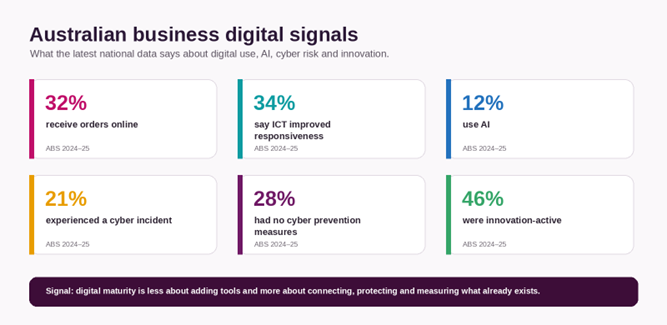 Figure 1. Selected Australian business digital signals, based on ABS 2024–25 data.
- Start with the business outcome, not the software
The fastest way to create digital complexity is to start with a product demo. A CRM vendor shows a powerful pipeline, an automation platform shows hundreds of integrations, or an AI tool promises to remove hours of work. The temptation is to buy the capability first and work out the process later.
A stronger approach starts with the operational outcome. Are you trying to shorten quote-to-cash time? Reduce missed follow-ups? Give customers self-service access? Improve stock visibility? Remove duplicate data entry? Give managers a daily view of performance? Once the outcome is clear, the technology decision becomes narrower and easier to justify.
This also protects the business from “tool drift” – the gradual accumulation of platforms that solve small problems independently but make the overall operating model harder to manage.
- Map one end-to-end workflow before integrating anything
Most digital problems are easiest to see when you follow one real customer journey from beginning to end. For a service business, that might be: enquiry → qualification → proposal → approval → project → invoice → support. For ecommerce, it might be: product discovery → order → payment → fulfilment → returns → retention.
Map the journey in plain language. Note where information is created, who owns each step, which system stores the data, where people re-enter information and where customers have to wait. The objective is not a perfect process diagram. It is to identify the points where work leaves one system and must be manually reconnected in another.
A useful diagnostic: follow the friction
| What you notice | What it often means | A better digital response |
| Staff copy customer details between tools | Systems do not share a reliable customer record | Integrate the systems or create one source of truth |
| Managers wait for weekly reports | Operational data is fragmented or delayed | Create automated reporting from live source systems |
| Customers repeatedly ask for status updates | The service journey is not visible externally | Add a portal, notifications or self-service status |
| The same approval happens through email and chat | Workflow ownership is informal | Create a controlled approval workflow with audit history |
| Teams avoid a system and keep spreadsheets | The tool does not match the real workflow | Simplify the process or build a better-fit interface |
- Decide where the “truth” lives
Connected systems still fail when nobody knows which system owns the authoritative version of the data. Customer names may exist in the CRM, invoices in accounting, support history in a helpdesk and project contacts in a project tool. That can work, but only if the business decides which system owns each core data object and how changes move between platforms.
For example, a CRM might own lead and customer relationship data, the finance system might own invoices and payments, and a project platform might own delivery milestones. Integrations should move the information needed for the next step without creating unnecessary duplicate records everywhere.
This sounds technical, but it is primarily a governance decision. Clear ownership prevents reporting disputes, reduces rework and makes future automation far more reliable.
- Integrate before you replace
Many SMEs assume digital transformation means replacing everything with one large platform. Sometimes that is the right decision, but often it is expensive and disruptive. A better first question is whether the existing tools can be connected well enough to remove the main operational pain.
A website form can create a CRM record automatically. A won opportunity can create a project. A completed milestone can trigger an invoice request. Payment status can be surfaced to account managers. A customer portal can read project information without exposing the project system itself. These are relatively simple examples, but they illustrate an important principle: a connected architecture can create substantial value without forcing every team into the same application.
- Clean the data before adding AI
AI is increasingly part of the SME technology conversation. ABS reported that 12% of Australian businesses used AI in 2024–25, up sharply from 1% in 2021–22. Adoption was higher among innovation-active businesses, including 19% of innovation-active small businesses compared with 4% of non-innovation-active small businesses.
The opportunity is real, but AI magnifies the quality of the operating foundation underneath it. If customer records are duplicated, permissions are unclear or reports are based on inconsistent definitions, AI can produce a faster answer without producing a better answer.
Before automating with AI, make sure the workflow has a clear owner, the input data is reasonably clean, the system boundaries are understood and there is an obvious point where a human should review sensitive or high-impact outputs. AI should be a capability layer on top of a sound process, not a substitute for one.
- Treat security, QA and resilience as part of the product
Digital growth increases the number of systems, accounts, integrations and data flows a business must protect. In 2024–25, 21% of Australian businesses reported experiencing a cyber security incident, and 28% reported having no measures in place to prevent cyber incidents. For small businesses, ASD’s Australian Cyber Security Centre reported an average self-reported cybercrime cost of about $56,600 per report in FY2024–25.
Security is therefore not a separate task to perform after launch. It belongs in the design. Account permissions, multi-factor authentication, backups, logging, patching, third-party access and recovery plans should be considered alongside functionality.
The same is true of quality assurance. When a website, CRM, mobile app, payment flow and reporting layer are connected, a small change in one place can affect another. Structured testing reduces the chance that a new feature quietly breaks a critical customer or financial workflow.
- Build mobile experiences only where mobility changes the work
A mobile app is valuable when it makes a business process meaningfully easier away from a desk: field inspections, technician updates, approvals, appointment workflows, delivery confirmation, inventory scanning, customer self-service or executive dashboards. It is less valuable when it simply copies a desktop system onto a smaller screen.
The decision should come from the workflow. Ask what the user needs to do in the moment, what information is required, what should work offline and what action would otherwise be delayed until the user returns to a computer.
- Measure the system by business behaviour, not feature count
One reason digital projects disappoint is that teams measure delivery rather than impact. The project is considered complete because the portal launched, the CRM was configured or the app was published. But the business outcome may still be unclear.
A better measurement set is operational: response time, conversion time, number of manual hand-offs, percentage of requests completed without email, reporting preparation time, support volume, error rates, repeat customer activity or time from approval to invoice. Choose a small number of measures that are already connected to the original business problem.
This matters because ABS reported that only 7% of businesses measured the contribution of digital activities to overall business performance in 2024–25. The businesses that build a measurement habit are in a better position to decide what to improve next.
A practical 90-day digital foundation roadmap
| Phase | Weeks | Focus | What “done” looks like |
| 1. Discover | 1–3 | Map one high-value workflow, data owners, systems, pain points and baseline metrics. | A clear current-state map and one prioritised outcome. |
| 2. Connect | 4–8 | Integrate or redesign the key hand-offs. Clean critical data and define permissions. | Information moves through the workflow with fewer manual steps. |
| 3. Prove | 9–12 | Test, monitor, train users and measure the chosen outcome. | The team can show a measurable operational improvement and a next-step backlog. |
When custom software becomes the sensible option
Off-the-shelf tools are usually the right starting point when the process is standard and the business can adapt without losing an important advantage. Custom software becomes more reasonable when the business has a workflow that is central to how it competes, when multiple systems need a tailored interface, when manual work is growing faster than the team, or when customers and staff need an experience that generic software cannot provide cleanly.
The business case should still be grounded in outcomes. Custom software is not automatically better because it is custom. It is better when the cost of the existing friction, limitations or workarounds is greater than the cost and risk of building and maintaining a better-fit solution.
What a technology partner should actually help with
A useful technology partner should do more than write code. They should help translate the business problem into a workable delivery plan, challenge unnecessary complexity, design the user journey, select an appropriate architecture, build integrations, test the system, support deployment and leave the client with a system that can be maintained.
Workspace InfoTech Australia PTY Limited currently positions its services across software development, web development, mobile app development, graphic design, quality assurance and hosting. Its website also describes a model where the team can work as a trusted technology partner or virtual team member for small businesses. That mix is relevant because connected digital operations usually cross several disciplines rather than fitting neatly into one service category.
Final thought
For Australian SMEs, the next stage of digital maturity is likely to be less about collecting more tools and more about making the existing digital environment work as one operating system for the business. The practical sequence is straightforward: understand the workflow, clarify data ownership, connect the right systems, strengthen security, measure outcomes and only then add more advanced automation or AI.
When the foundation is right, technology becomes quieter. Teams spend less time working around systems. Managers get better visibility without chasing reports. Customers experience smoother journeys. And future changes become easier because the business understands how its digital pieces fit together.
About Workspace InfoTech Australia PTY Limited
Workspace InfoTech Australia PTY Limited provides software development, web development, mobile app development, graphic design, quality assurance and hosting services. The company describes itself as an Australia-Bangladesh joint venture focused on helping businesses maximise their online potential through practical digital solutions and technology support.
Learn more: workspaceit.com.au